OpenScreen is trying to solve a very specific problem: how do you make polished product demos without paying for a closed desktop tool or stitching together a messy workflow yourself? Built by siddharthvaddem/openscreen, the project presents itself as a free, open-source alternative to Screen Studio. That framing is obvious. It is also a little too simple.
Once you read past the README, OpenScreen stops looking like clone-marketing and starts looking like a serious product still finding its edges. The stack is substantial: Electron, React, TypeScript, PixiJS, and a custom export pipeline that handles recording, editing, and rendering inside a single desktop app. For indie makers, developer advocates creating product demos, and internal product teams, that is a meaningful jump from “interesting repo” to “tool you might actually use.”
What OpenScreen is actually trying to do
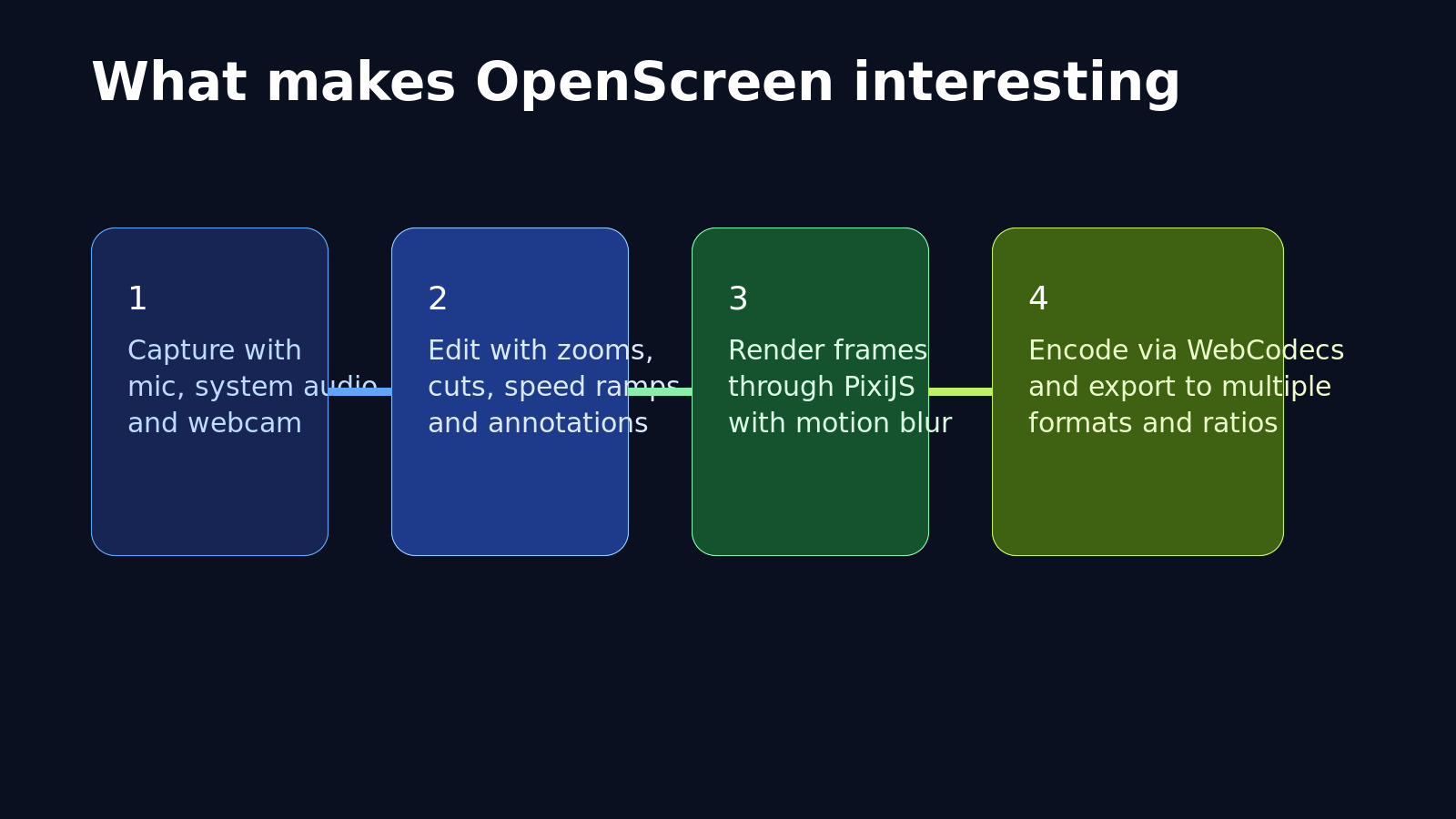
The use case is straightforward. Record a screen or a single window. Clean up the framing. Add zooms and annotations. Export something that looks intentional instead of looking like raw capture footage with a few effects slapped on top.
The README is refreshingly honest about scope. OpenScreen is not a 1:1 Screen Studio replacement, and it is still in beta. But the core workflow is already there: capture, crop, trim, zoom, annotate, change playback speed, and export in multiple aspect ratios. That covers most of what people in this category actually reach for.

The architecture matters more than the marketing copy
The most convincing part of OpenScreen is not the UI. It is the separation of responsibilities.
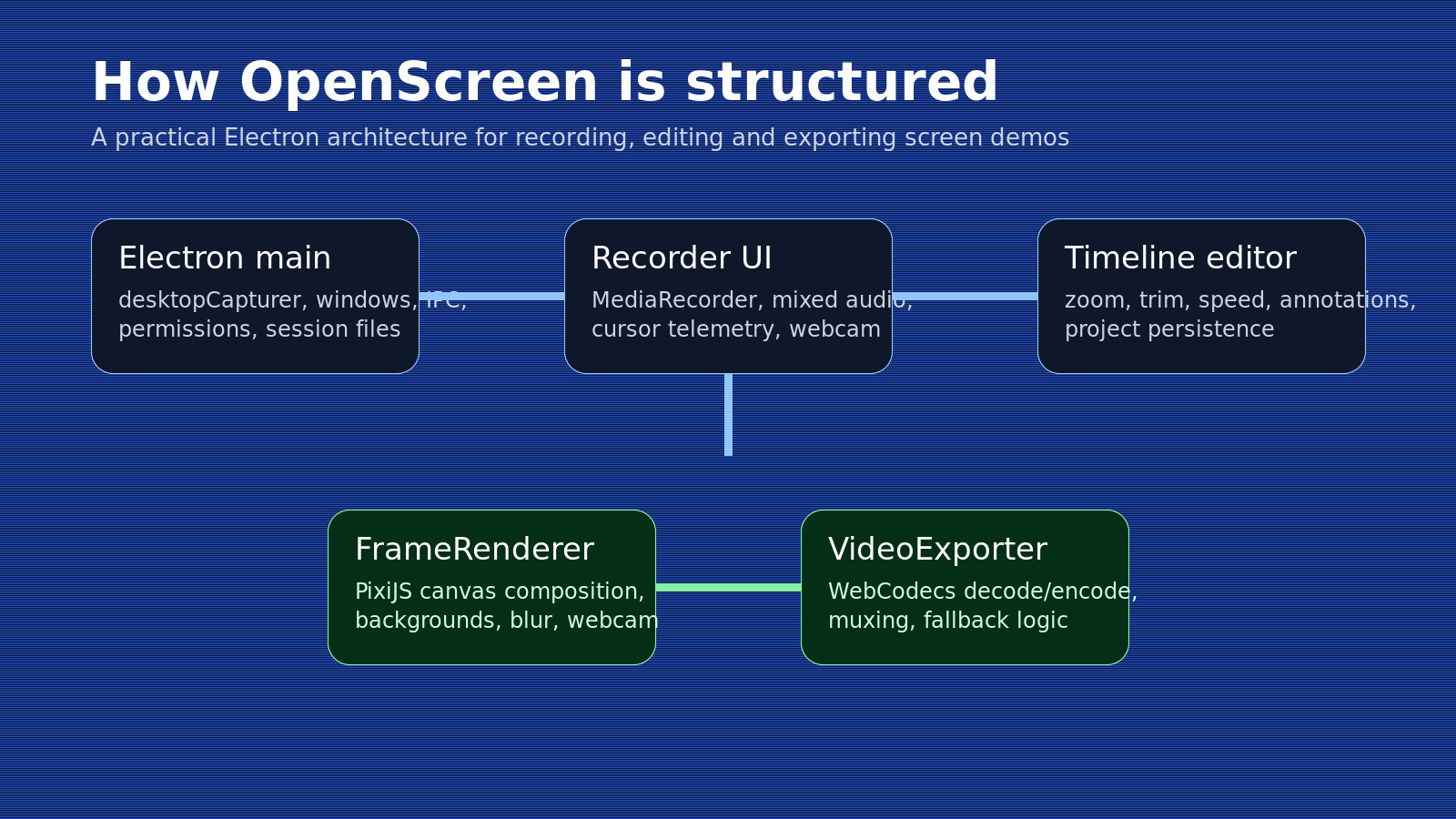
The Electron main process handles desktop capture, permissions, tray behavior, windows, IPC, recording-session persistence, and project file flows. That may sound mundane, but it is exactly the kind of boundary early desktop apps often get wrong. OpenScreen keeps OS-specific behavior where it belongs instead of letting it leak into the React layer.
The recording stack is also more thoughtful than it first appears. The useScreenRecorder hook does far more than start a MediaRecorder. It mixes microphone and system audio, supports optional webcam capture, chooses codec preferences, adjusts bitrate based on resolution, fixes WebM duration after recording, and saves a session manifest so the editor can reopen both screen and webcam sources reliably.
Then there is the cursor telemetry. It is a small implementation detail, but it says a lot about how the project is thinking. OpenScreen collects cursor samples in the Electron layer and later uses them in the timeline editor to suggest zoom regions. That pushes the product beyond generic screen recording and closer to a tool built specifically for demos.
Why the editing model works
The editor is timeline-based and organized around discrete region types: zoom, trim, speed, and annotations. That is a better design than dumping every effect into one giant state blob, because each editing feature can evolve without dragging the rest of the app into a knot.
The timeline uses dnd-timeline with custom wrappers, while project persistence stores normalized editor state in a dedicated .openscreen format. The persistence layer also normalizes file URLs across platforms. That is one of those annoying engineering details users never praise when it works, but absolutely notice when it breaks.
What OpenScreen is really trying to do is solve the whole demo-polish problem in one place: capture, camera framing, aspect-ratio changes, background styling, motion blur, annotations, and export settings that make the final video feel deliberate.
The export pipeline is the strongest technical signal in the repo
The export stack is where OpenScreen becomes much more than a nice UI around desktop capture. It does not just toss raw clips into a generic transcoder and hope the output looks good enough.
Its VideoExporter uses streaming decode, frame-by-frame rendering, WebCodecs-based encoding, and a dedicated muxing pipeline. Frames go through a FrameRenderer built on PixiJS, which handles backgrounds, zoom transforms, blur, shadows, webcam layout, and annotations. That is a serious architecture choice for a desktop creator tool, especially one that is still this early.
You can also see signs of real debugging work. One path explicitly reads raw pixels from the canvas instead of passing the canvas directly into VideoFrame, because some Linux GPU shared-image paths can silently produce empty frames. Elsewhere, the exporter watches for encoder stalls and retries with a safer encoder preference if hardware acceleration stops responding.
That kind of code is hard to fake. It usually only shows up after a maintainer has already run into platform-specific failures and decided to deal with them properly.
Strengths
- Clear product scope: OpenScreen is focused on polished screen demos, not on becoming a general-purpose video editor.
- Clean architectural boundaries: capture, editing, persistence, and export are separated in ways that should scale better as the project grows.
- Serious technical ambition: PixiJS composition plus WebCodecs export is not a toy approach.
- Honest positioning: the README does not pretend the app already matches Screen Studio feature for feature.
- Open-source leverage: MIT license, commercial use allowed, and fast-growing community interest.
Tradeoffs and limits
- It is still beta: the maintainer says this directly, and the issue tracker suggests there is still polishing left to do.
- Platform quirks are part of the story: macOS permissions, Linux PipeWire requirements, and sandbox workarounds are not edge trivia. They affect real usability.
- It is not feature-complete against Screen Studio: anyone looking for every premium flourish will still find gaps.
- Electron has a cost: cross-platform flexibility comes with more desktop overhead than a native app would.
- Documentation is still catching up: the code is readable, but deep architectural documentation remains limited.
Who should pay attention
OpenScreen looks especially useful for indie hackers, developer advocates, SaaS teams making walkthroughs, and engineers who want more control than closed tools allow. It is also a strong reference project for anyone building media-heavy desktop apps with modern development tools.
If your only question is whether it can replace part of a commercial workflow today, the answer is probably yes for some users already. If your question is whether the codebase is worth studying, that answer is even clearer. OpenScreen is one of those repos where the implementation is at least as interesting as the product pitch.

Frequently Asked Questions
Is OpenScreen free to use for commercial projects?
Yes, OpenScreen is released under the MIT license, which allows commercial use without restrictions. You can use it for client work, internal company demos, or product marketing materials.
What are the system requirements for running OpenScreen?
OpenScreen runs on macOS, Windows, and Linux. On macOS, you’ll need to grant screen recording permissions. Linux users need PipeWire for screen capture. The app is built with Electron, so expect similar resource usage to other Electron-based desktop applications.
How does OpenScreen compare to Screen Studio?
OpenScreen is inspired by Screen Studio but is not a feature-complete replacement. It covers the core workflow—capture, editing, zoom, annotations, and export—but lacks some premium features. The main advantage is that it’s free, open-source, and customizable for developers who want control over their toolchain.
Can I export videos in different aspect ratios?
Yes, OpenScreen supports multiple aspect ratio exports, making it suitable for different platforms like YouTube (16:9), Instagram (1:1 or 9:16), and other social media formats.
Is OpenScreen suitable for long-form tutorial videos?
OpenScreen is optimized for polished product demos and short-form content. While you can use it for longer recordings, the tool is designed around the demo use case with features like cursor-based zoom suggestions and quick annotation workflows.
The bigger takeaway
Projects branded as “open-source alternatives” only become meaningful when they do more than copy pricing. OpenScreen feels promising because it is already making real product and engineering decisions: capture cleanly, model edits explicitly, render deterministically, and ship something useful before chasing every edge-case feature.
That does not mean it replaces Screen Studio overnight. It means something more interesting: a focused open-source desktop app is starting to show how far it can go when the maintainer pays attention to the unglamorous details.
If you’re building developer tools or automation workflows, OpenScreen is worth examining both as a product and as a reference implementation for media-heavy Electron applications.
Repository checked on April 6, 2026 (ICT). At the time of writing, the repo showed roughly 22.2k stars, was created in October 2025, and was licensed under MIT.